
How to use the Teaching Guide Library
The Teaching Guide Library is one searchable flipbook of 111 teaching guides covering the Texas contracts and forms you use every day. It explains each form section by section, with Real's own compliance notes on how to fill it out. This page shows you how to find what you need fast.
One place for the right form, filled out the right way
The Texas Broker Team built this library to give every Real agent in Texas the same clear answers about contracts and forms, whenever they need them.
Compliance consistency
Every guide carries the broker team's best practices for that form, so every agent fills it out the same way. That means fewer file corrections, fewer delayed closings and fewer compliance issues.
Self-serve answers, 24/7
Find the right form and how to complete it in seconds, from your laptop or your phone, at 9 p.m. on a Sunday. You don't have to wait for a call back.
Onboarding new agents
Seven modules take a new agent from the sales contract through addenda, notices, representation agreements and Real's required forms, in a logical order.
Our broker team is still here for you. The library handles the everyday "which form, and how do I fill it out?" questions, which gives the broker team more time for the questions that really need them.
Everything on one screen
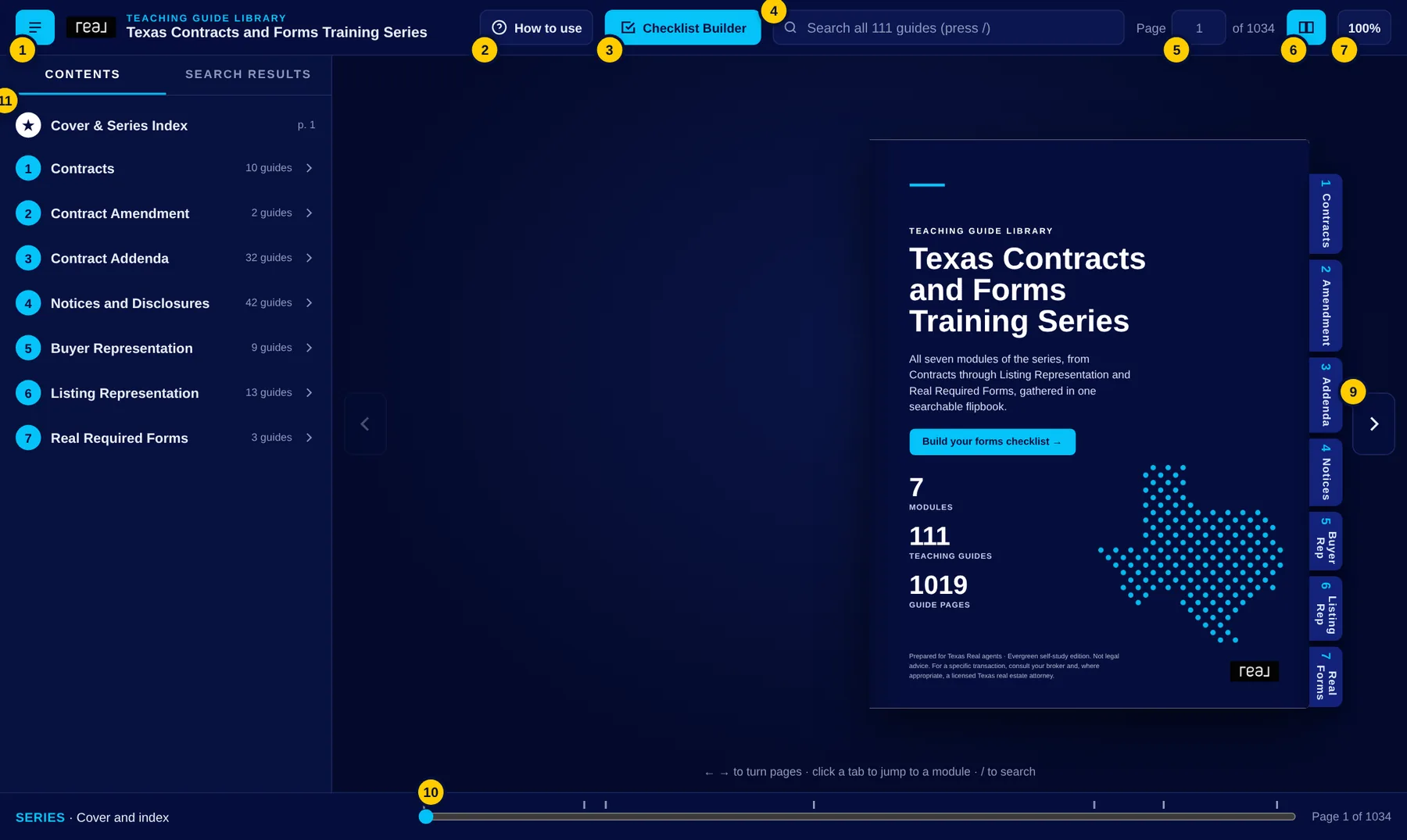
- 1Contents shows or hides the left panel.
- 2How to use opens this page.
- 3Checklist Builder builds your forms checklist (see section 7).
- 4Search searches every word in every guide (see section 5).
- 5Page box: type a page number and press Enter to jump there.
- 6View switches between a two-page spread and one page at a time.
- 7Zoom cycles 100%, 150% and 200% for small print.
- 8Module tabs on the edge of the book jump to the start of any module.
- 9Arrows turn the page. Your keyboard's ← and → keys work too.
- 10Scrubber: drag to move quickly through the whole book. The marks show where each module starts.
- 11Contents panel: click a module to open its list of guides, then a guide to see its sections. Click any line to go straight to that page.
Seven modules, in the order a transaction happens
- 1ContractsThe sales contracts (One to Four Family resale, condominium resale, new home, new condominium, unimproved property, farm and ranch) and the residential leases.
- 2Contract AmendmentChanging an executed contract or a signed lease the right way.
- 3Contract AddendaFinancing, sale of other property, back-up, temporary leases, HOA, propane, 1031 exchange, relocation and environmental addenda, plus the lease addenda (animals, guaranty, pool/spa, bed bugs, flood, fee in lieu of deposit).
- 4Notices and DisclosuresSeller's disclosure, intermediary, flood, special districts, termination notices, earnest money release, inspector information, the critical date list, surveys (T-47), net sheets, insurance, mineral, windstorm and border notices, lead pamphlets, and lease applications and inventory.
- 5Buyer RepresentationThe Buyer/Tenant Representation Agreement (long and short form), its termination and amendment, the unrepresented customer showing form, and the compensation and referral agreements.
- 6Listing RepresentationListing agreements for sale, lease and farm and ranch, their amendments and termination, the condominium, named exclusions and keybox addenda, and the listing checklist.
- 7Real Required FormsReal's IABS, the Affiliated Business Arrangement Disclosure (ABAD) and the Consumer Choice and Referral Fee Disclosure. Real requires these on every transaction. The ABAD isn't required on leases.
The Series Index
The pages right after the cover list every guide in every module with its page number. Click any guide to open it.
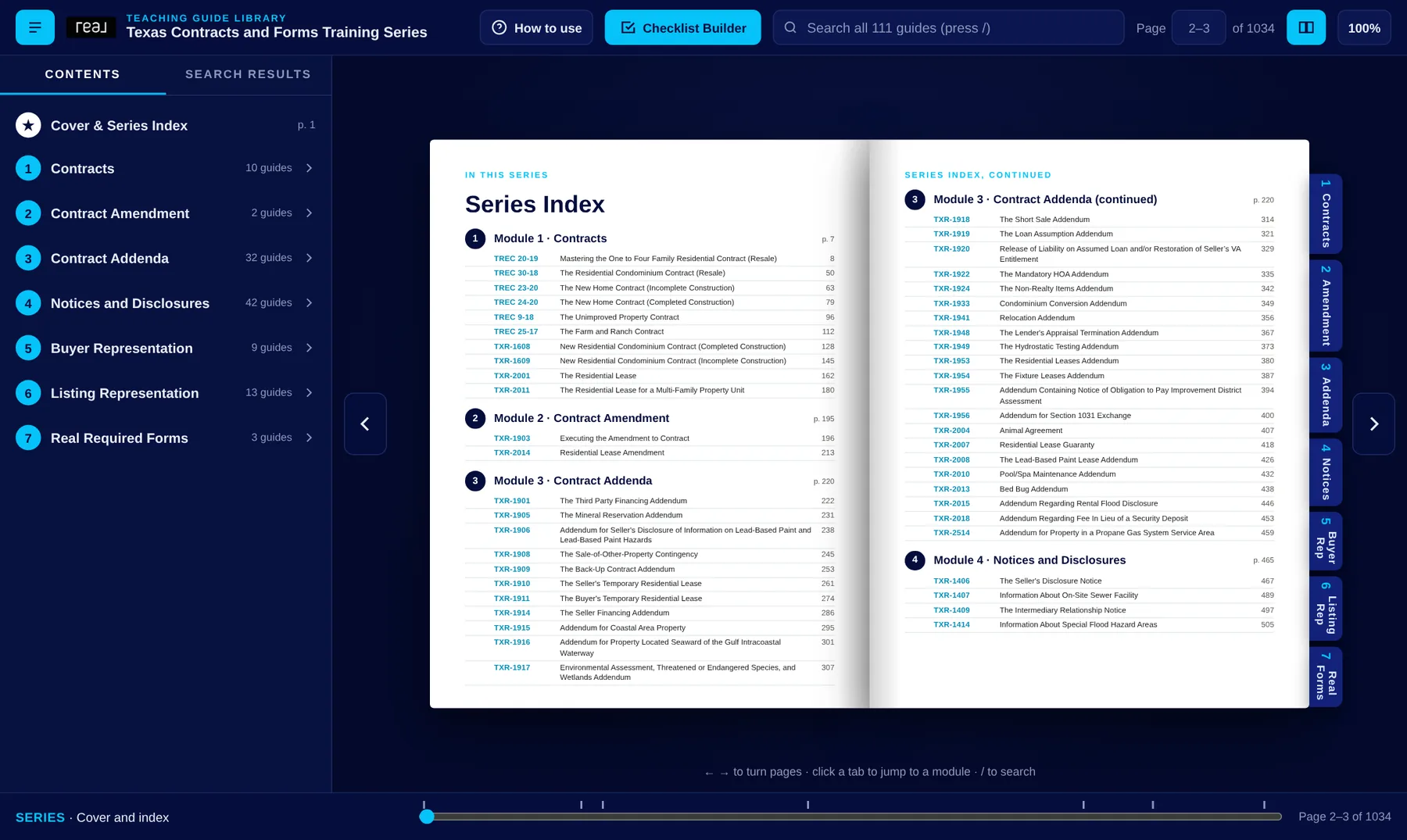
Module intro pages
Each module starts with an intro page listing the guides in that module. Long modules continue the list on the next page. Click a guide to jump to it.
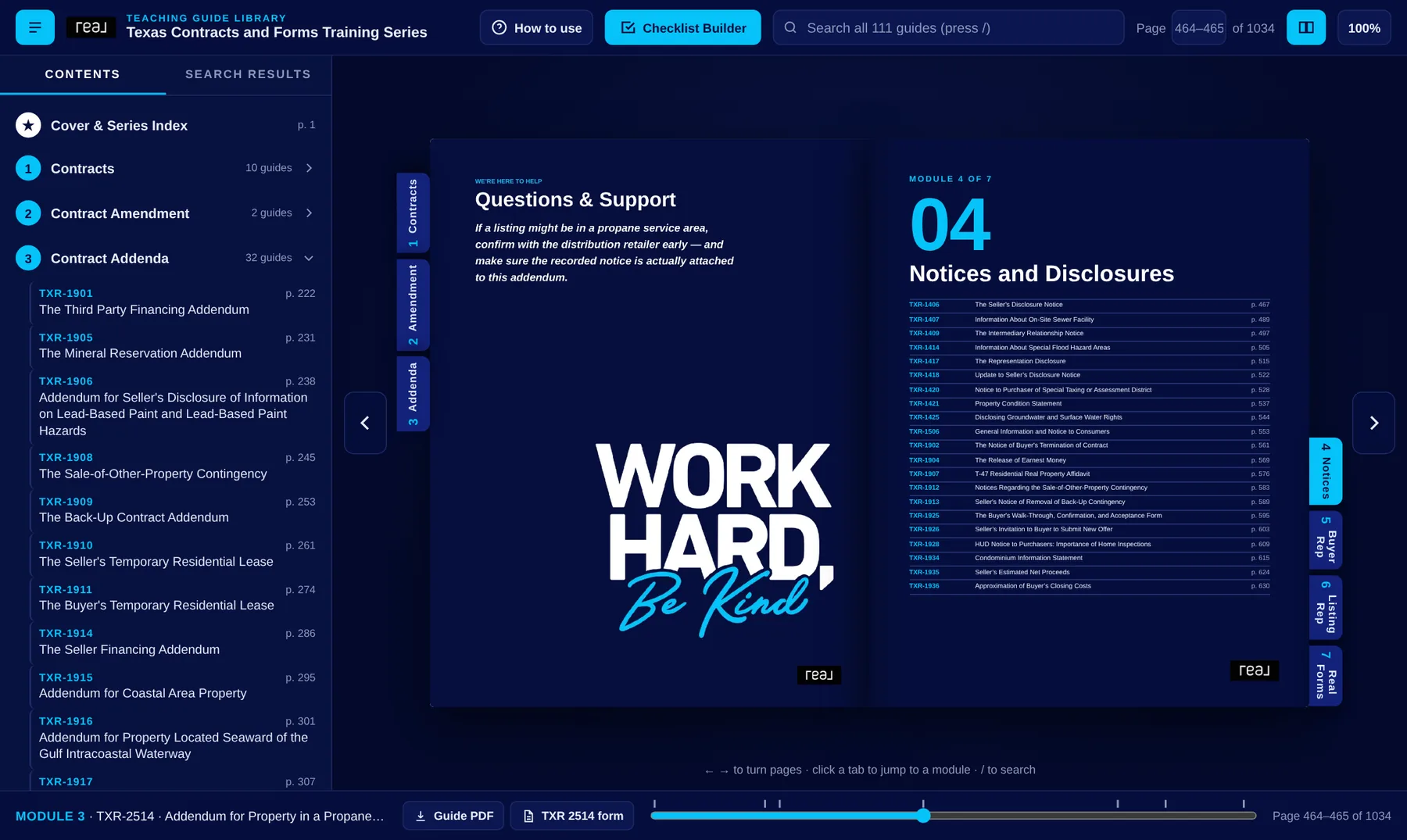
Every guide follows the same layout
Once you've read one guide, you know where to find things in all of them.
- Cover: the form's name and number, the module it belongs to, and buttons to download the guide and the form.
- Contents: every section of the guide. Click a line to jump to it.
- Introduction: why the form exists and when you use it.
- Section by section: each part of the form in plain language, with a screen grab of that part of the actual form.
- Recap: the key points to walk away with.
- Questions & Support: who to talk to when your situation goes beyond what the form plainly says.
Reading a section
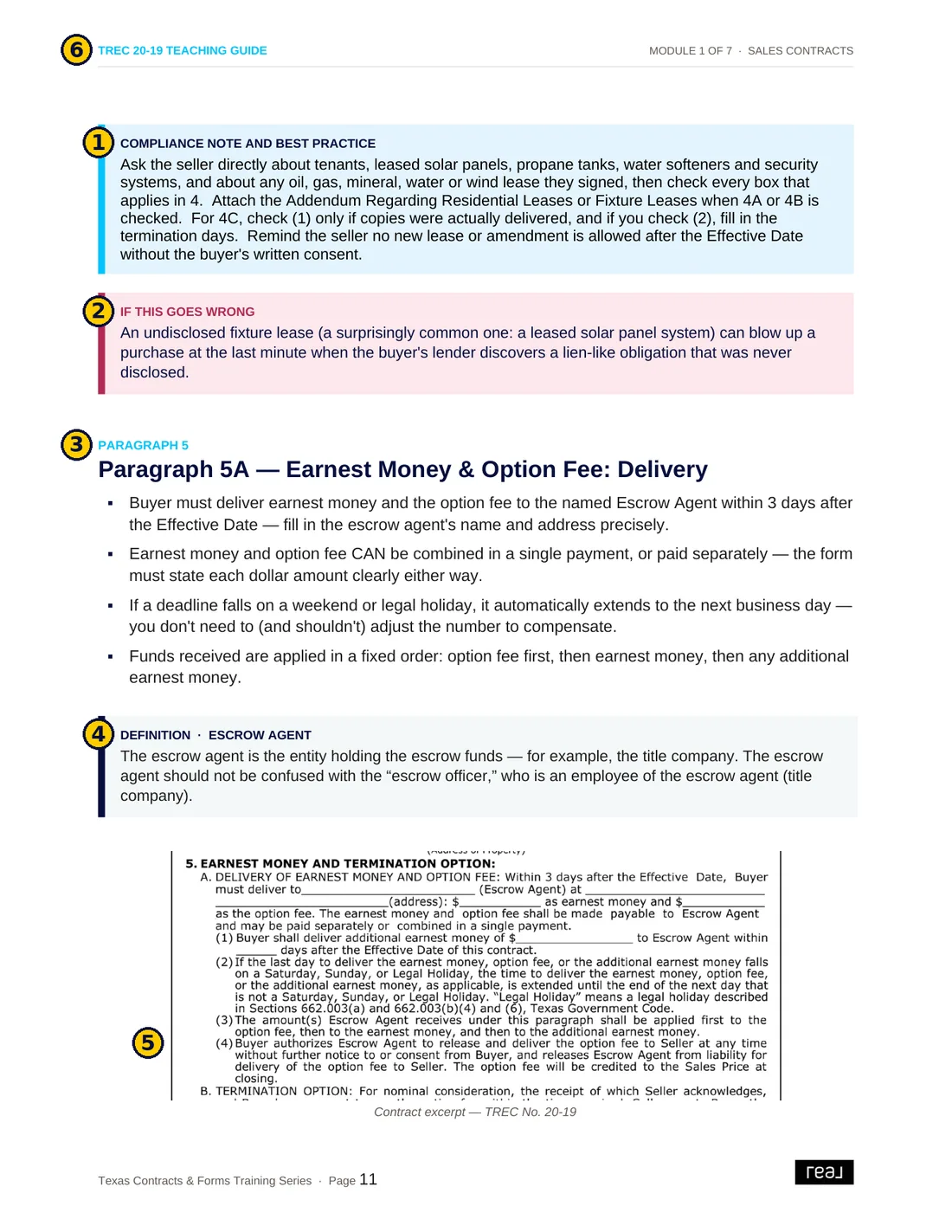
- 1Blue box: Compliance Note and Best Practice. What Real's broker team wants you to do on this part of the form. Read these first.
- 2Red box: If This Goes Wrong. What happens when this part is done wrong, such as delayed closings, lost earnest money or compliance problems.
- 3Section label and heading. The paragraph of the form being covered, with the key points as bullets.
- 4Definition box. A plain-language meaning for a term the form uses.
- 5Form excerpt. The real wording from the blank form, so you can see exactly what you're filling in.
- 6Page header. Which guide and module you're in.
Search all 111 guides at once
- Click the search box at the top, or press / on your keyboard.
- Type a form number (
1901), a paragraph (7D), or a phrase (earnest money,walk-through,FIRPTA). - The Search results tab opens on the left, with every match grouped by guide.
- Click any result. The book jumps to that page and highlights the words in yellow. The current match is a brighter orange.
- Press Enter for the next match, or Shift + Enter for the previous one. Press Esc or the ✕ to clear the search.
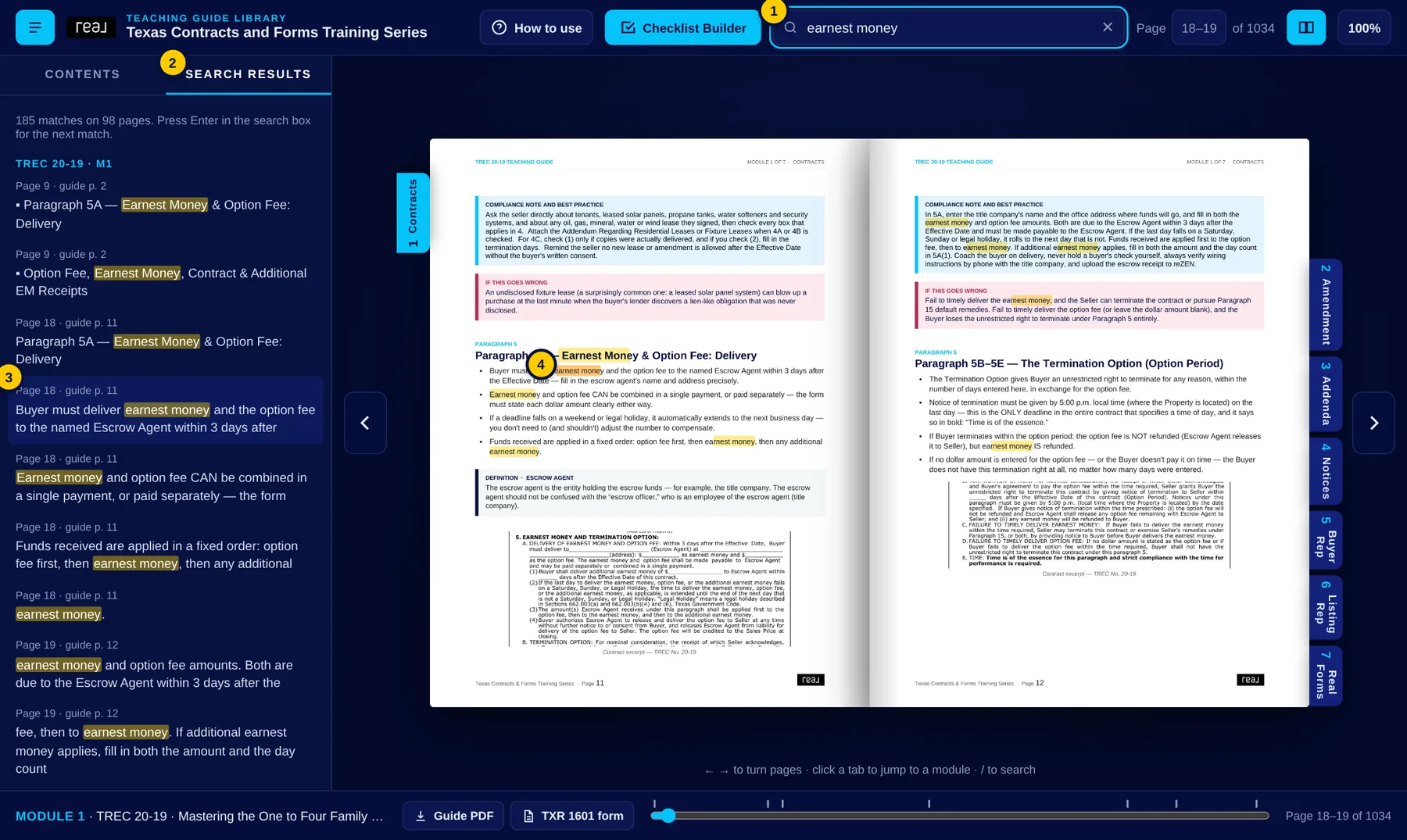
Tip: If a search finds too much, add a word (option fee refund instead of option). If it finds nothing, try fewer words or just the form number.
Take the guide and the form with you
Every guide has two buttons, and they appear in three places.
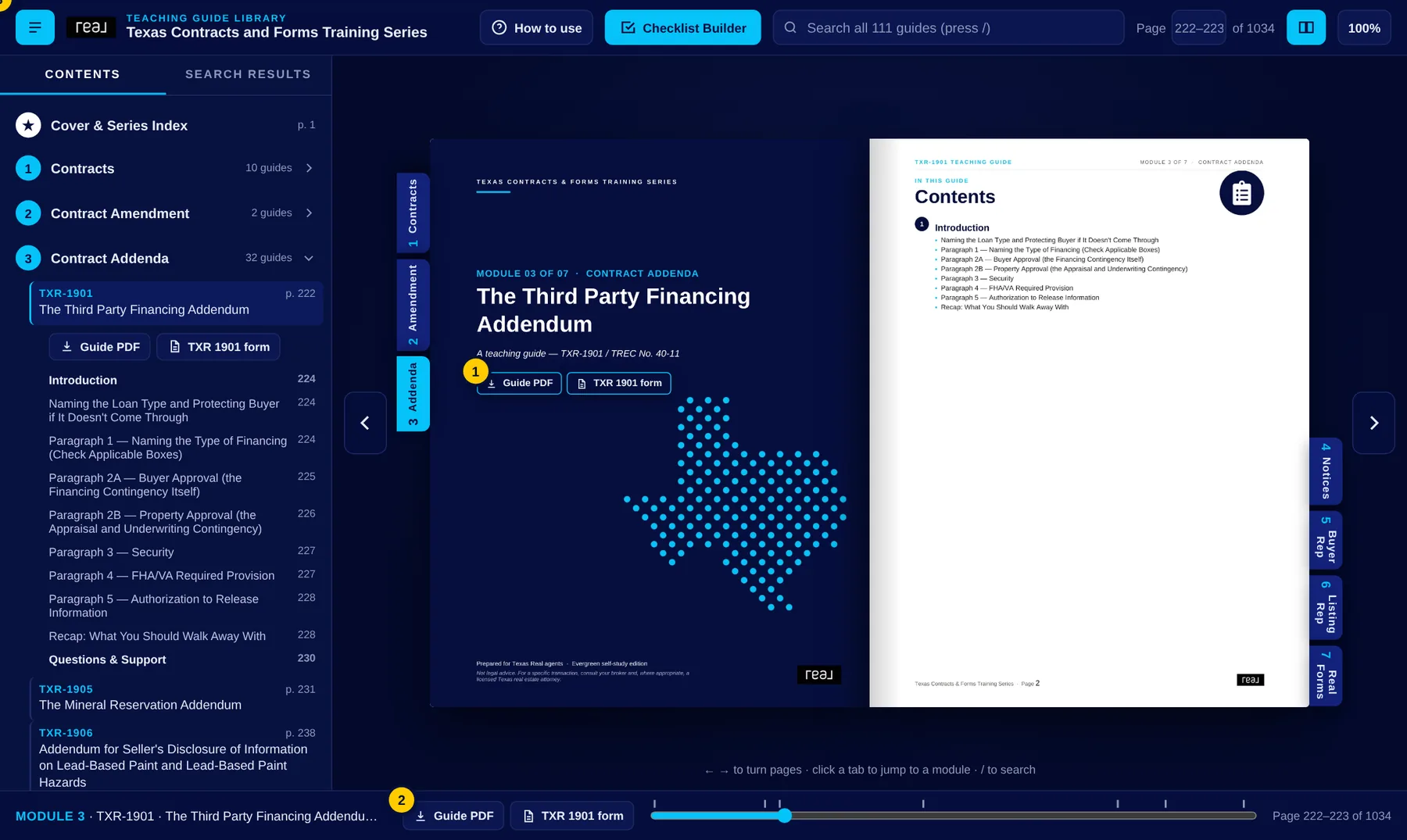
| Button | What it does |
|---|---|
| Guide PDF | Downloads the full teaching guide as a PDF to read offline, print or share with your team. |
| TXR #### form | Opens the blank form in the Texas REALTORS® Forms Library. You need your Texas REALTORS® member login, so sign in at texasrealestate.com first if it asks. |
| Real IABS / ABAD / CCRF form | Downloads Real's own required forms straight from the library, with no login needed. Always use the Real IABS, which already has Real Broker, LLC's information, instead of the blank Forms Library copy. |
"Which forms do I need for this deal?"
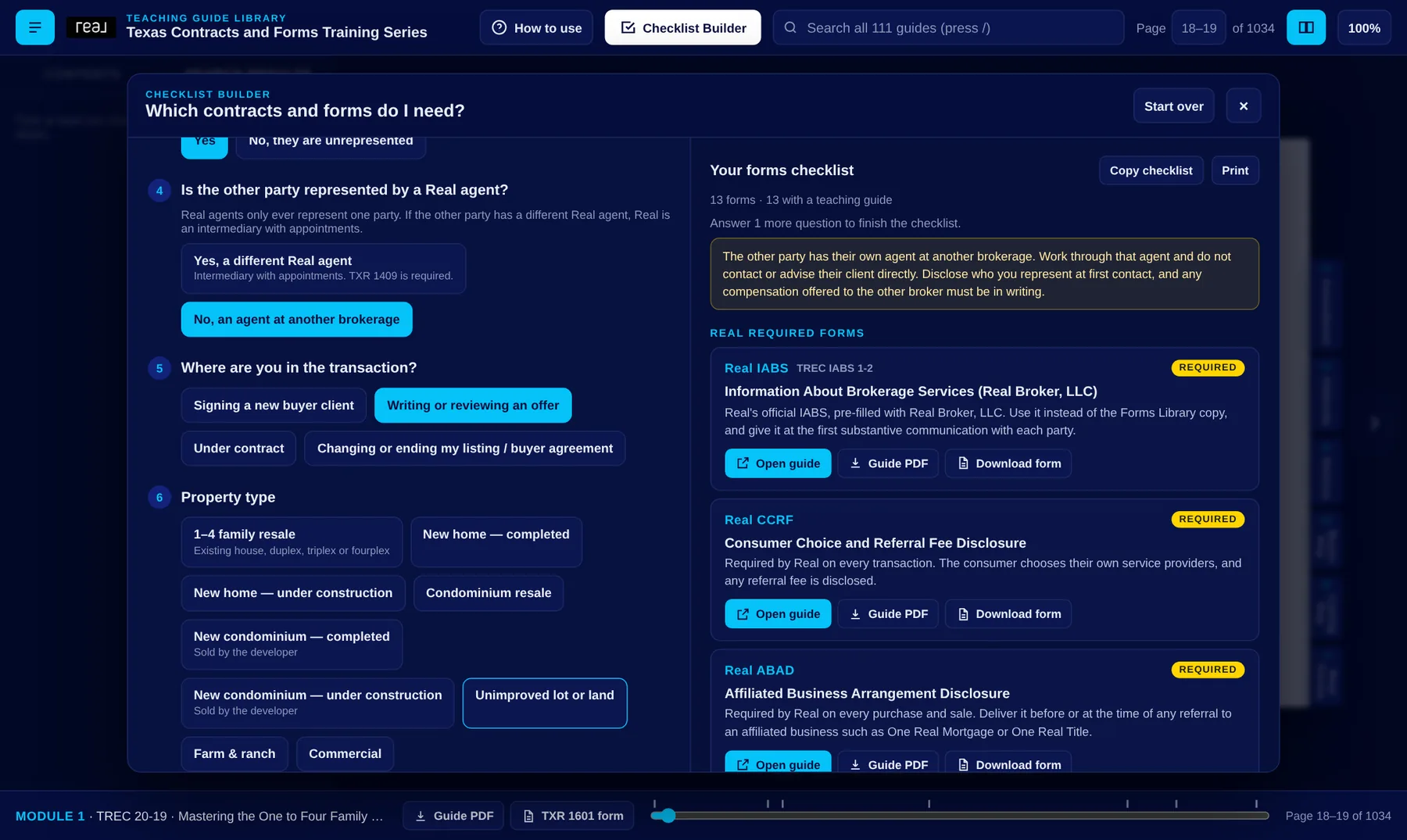
Answer a few questions about your transaction, and the Checklist Builder builds a checklist of the contracts, addenda and notices you need, each linked to its teaching guide.
- Click Checklist Builder in the top bar. You can also click Build your forms checklist on the cover.
- What kind of transaction is it? Sale / purchase, or residential lease.
- Who do you represent? The seller (landlord), the buyer (tenant), or a buyer you're showing to without representing them.
- Is the other party being represented? If Yes, you're asked Is the other party represented by a Real agent? A Yes there means Real is an intermediary with appointments, so the checklist adds the TXR 1409 Intermediary Relationship Notice. If the other party isn't represented, the checklist shows how to treat an unrepresented party.
- Where are you in the transaction? Taking a listing, signing a client, writing an offer, under contract, or changing an agreement.
- Answer the follow-up questions that appear, such as property type, year built, HOA, flood zone, financing and offer terms. Only questions that apply to your answers are shown.
Reading the checklist
- Real required forms are always at the top: the Real IABS and the Consumer Choice and Referral Fee Disclosure on every transaction, and the ABAD on every sale.
- The rest are grouped the way a file is built: representation, agreements, contract, addenda, disclosures and notices, during the contract.
- Each form has a label: Required Recommended If applicable, plus one line on why it's on your list.
- Yellow notes at the top flag things to watch for in your scenario, such as how to work with an unrepresented party or an intermediary transaction.
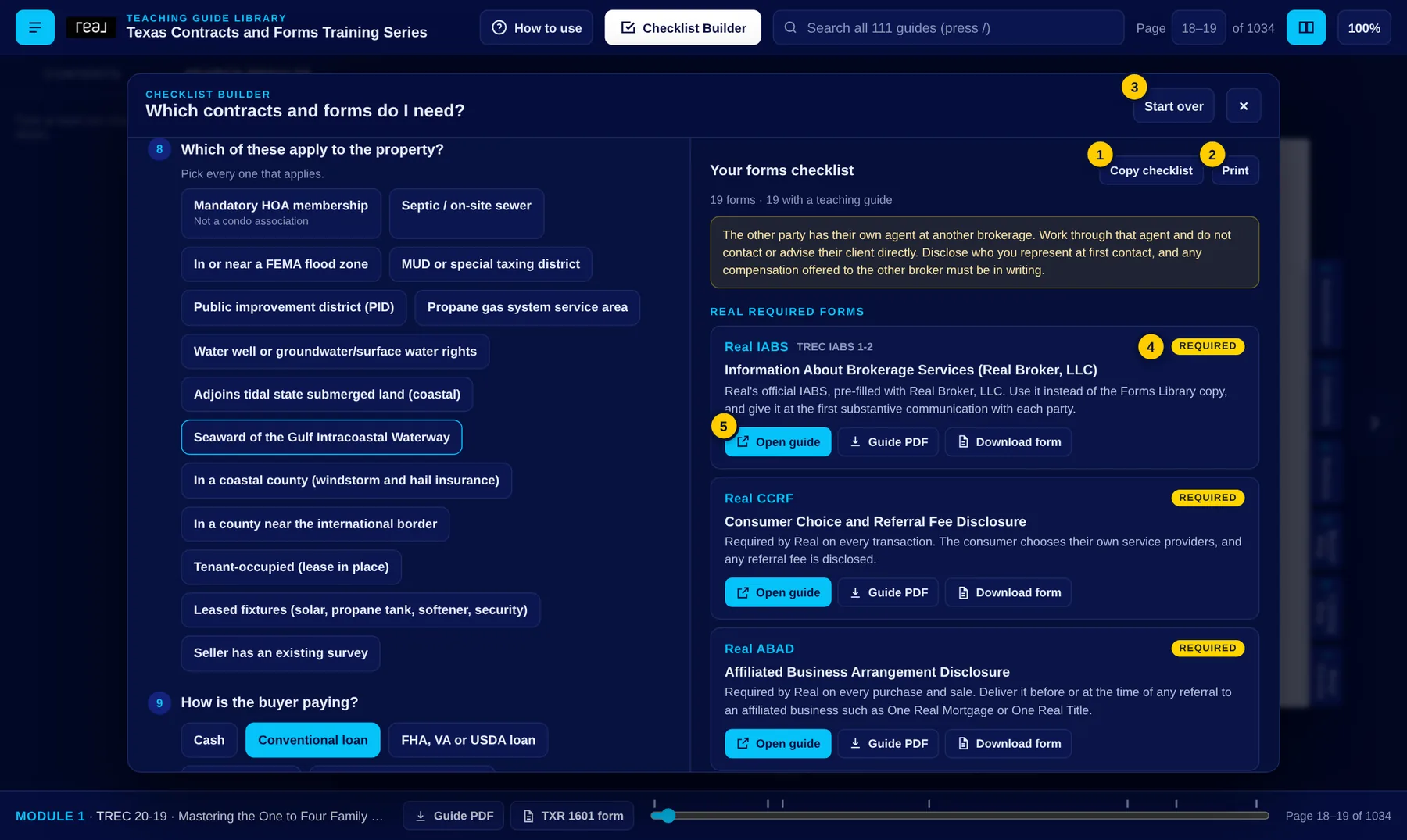
- 1Copy checklist copies the list as text, ready to paste into a note, an email or your transaction file.
- 2Print prints the checklist on its own, or saves it as a PDF.
- 3Start over clears every answer for a new transaction.
- 4Label: Required, Recommended, or If applicable.
- 5Open guide jumps to that form's teaching guide. Guide PDF and Download form sit beside it.
The Checklist Builder is a training aid, not legal advice. It covers the everyday residential forms in this series. Always confirm your file with your broker, especially for commercial, farm and ranch, seller financing or short sales.
The same library in your pocket
On a phone the book shows one page at a time.
- Swipe left or right on the page, or tap the ‹ › arrows at the sides, to turn one page at a time.
- Module chips under the top bar jump to any module.
- The ☰ menu opens the contents and search results.
- The ? button opens this page, and the ☑ button opens the Checklist Builder.
- The footer icons download the guide PDF and open the form.
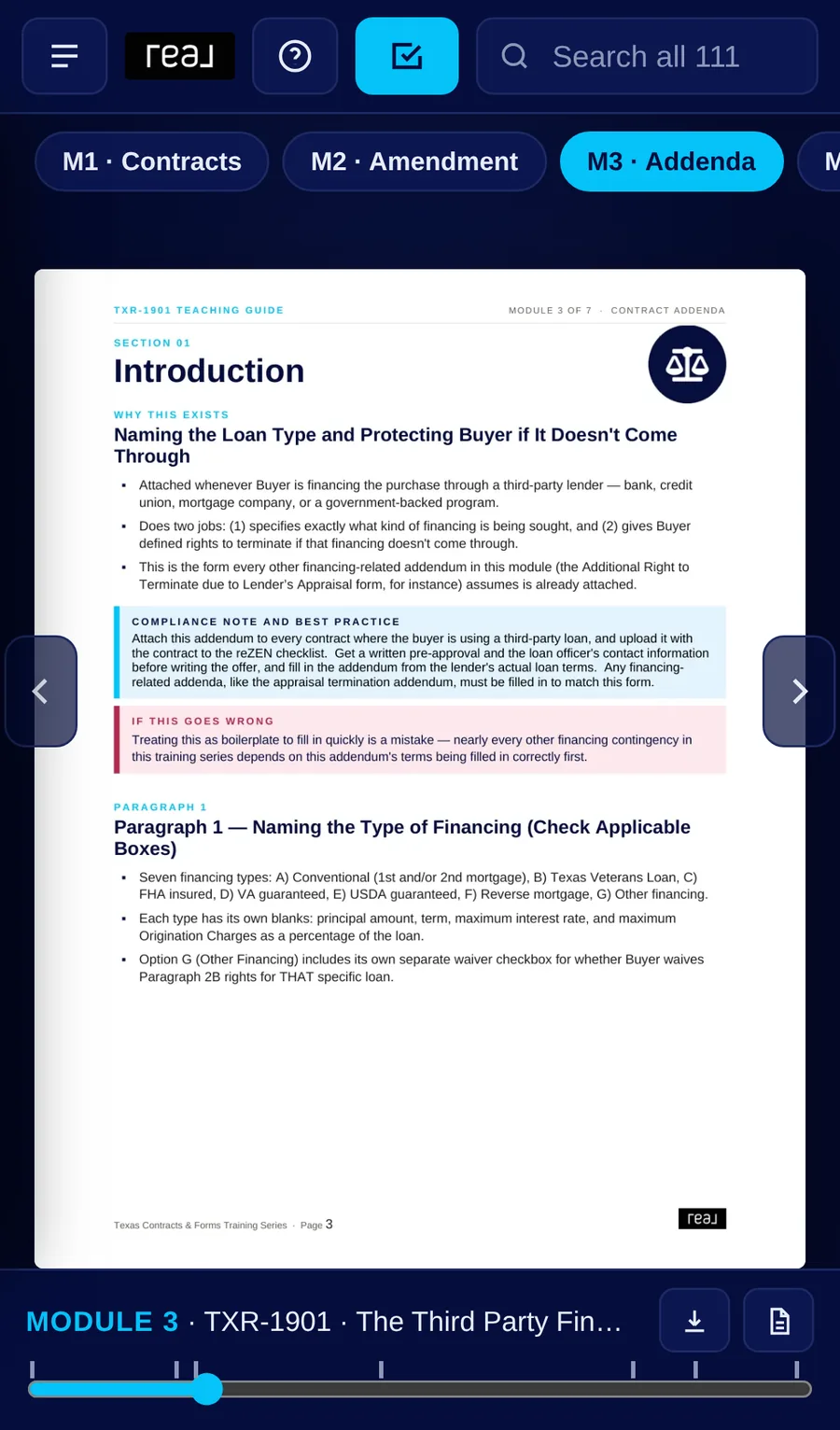
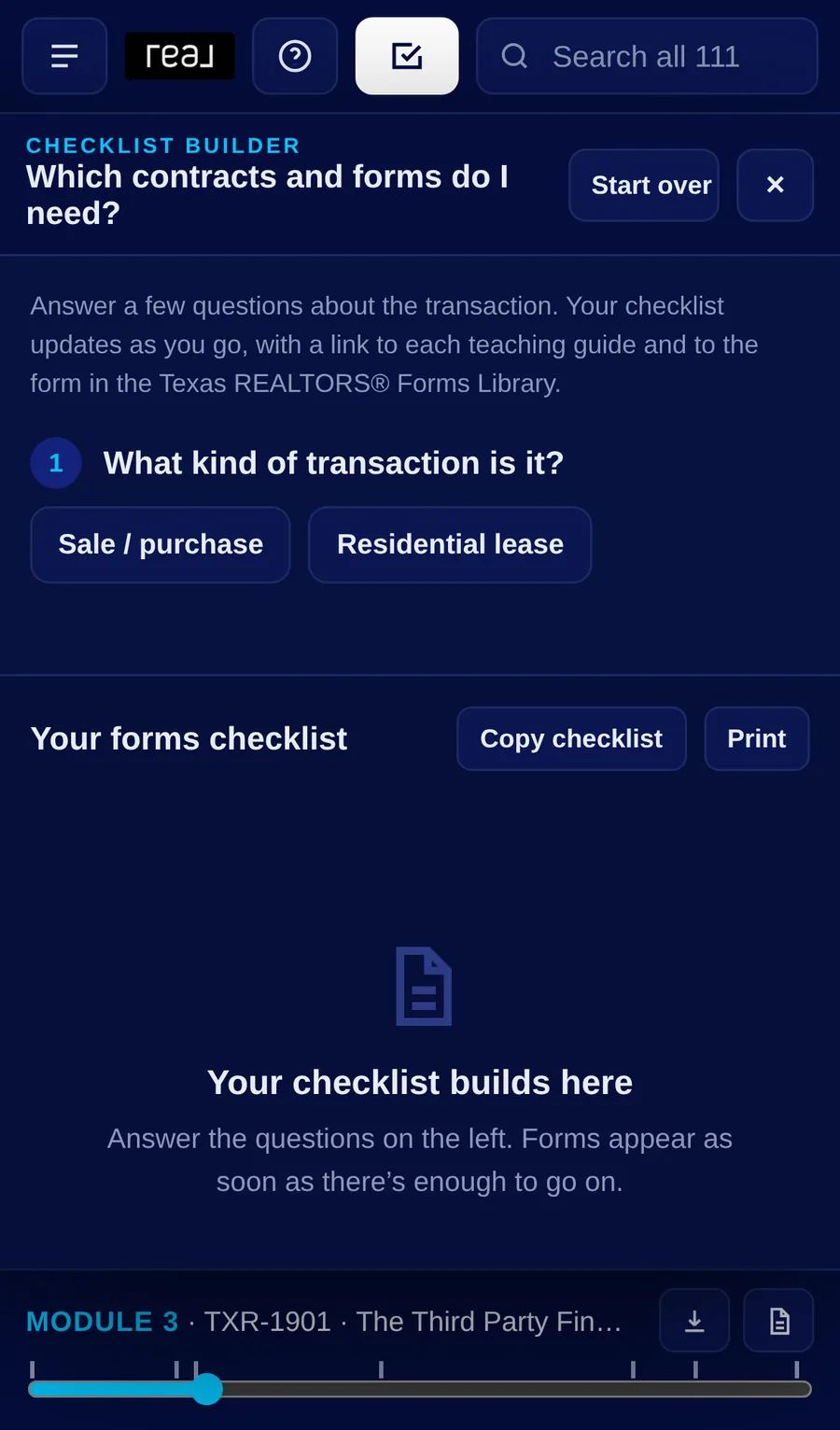
Tip: Add the library to your home screen. In Safari tap Share, then Add to Home Screen. In Chrome tap ⋮, then Add to Home screen.
Get there faster
| Keyboard | Does this |
|---|---|
| ← → | Previous / next page |
| / | Jump to the search box |
| Enter / Shift+Enter | Next / previous search match |
| Esc | Clear the search, or close the Checklist Builder |
| Home / End | First / last page |
Links you can share
Add one of these to the end of the flipbook's web address to send someone straight to a spot. It's handy in a text to an agent who asks a question.
| Add this | Opens |
|---|---|
#txr1901 | The TXR-1901 guide (use any form number, such as #txr1409 or #trec2019) |
#m4 | The start of Module 4 |
#p120 | Page 120 |
#checklist | The Checklist Builder, already open |
Questions agents ask
Is this legal advice?
No. The library is a training aid. It helps you fill in the blanks correctly and spot when to stop and ask. It never replaces your broker or a Texas real estate attorney, and agents should never draft contract language or interpret legal effect for a client.
Why won't a form link open?
Forms Library links need your Texas REALTORS® member login. Sign in at texasrealestate.com, then click the link again. Real's own forms (IABS, ABAD, CCRF) download without a login.
What if a form looks different from the guide?
When TREC or Texas REALTORS® revise a form, or Real updates a policy, the guide is updated and the library is republished. If a form in the Forms Library looks different from the guide, follow the current form and let the broker team know.
Which Real policies are built in?
Among others: Real does not allow intermediary without appointments, and a Real agent represents only one party. Real prohibits property management. All fees go through the broker. And the Real required forms go on every transaction. Look for them in the blue boxes.
Who do I ask when the guide doesn't cover my situation?
Your broker or the Texas Broker Team. Every guide ends with a Questions & Support page for exactly that.